Technical Designer
Portal 2 Ingredients – Unreal Engine 5
In September 2023, I decided to challenge myself to remake as many ingredients from Portal 2 as I could in 2 days, using Unreal Engine 5.3.
Given this very short timeframe, my intent was not to focus on visuals or polish, but strictly on functionality.
Prod. Schedule
September 16-17, 2023
Engine
Unreal Engine 5.3
my role
Technical Designer
Platform
PC (Windows)
Intentions
I wanted to make prototypes of as many ingredients as I could within my timeframe. My plan was to come up with a way of creating and iterating on new ingredients in a quick and efficient manner. I started by making a list of ingredients, sorting them into two different categories : Interactables and Powerables.
Interactables vs Powerables
Interactables are objects that transmit power when interacted with, while powerables are objects that receive power from Interactables. Here are some examples of ingredients that belong to either class :
| Interactables | Powerables |
|---|---|
| Button | Door |
| Laser receivers | Light bridge |
| Light beam | |
| Gel dispenser |
Building a system that allows for fast iterations
Now that I determined the core functionality of these two types of ingredients, I could focus on building the ingredient creation pipeline.
Step 1 – Parent Classes
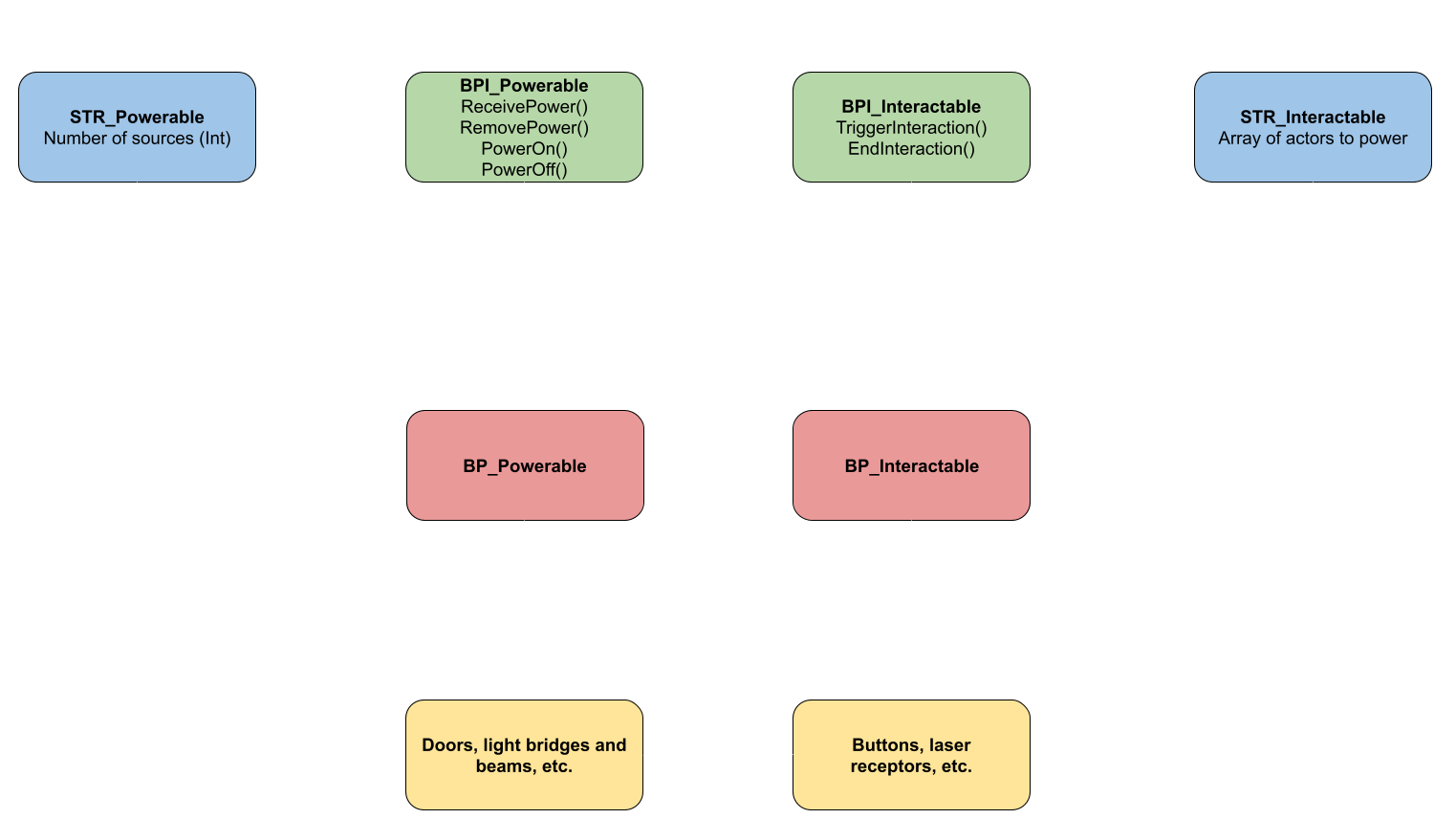
I started by creating two Blueprint classes that act as “parents” for these ingredient types. These parent classes contained all the shared logic the soon-to-be made ingredients would use.
Step 2 – Interfaces
I followed that up by creating and implementing a Blueprint Interface for each of these. These interfaces included the functions that would be called to trigger the functionality of each ingredient.
Step 3 – Structures
Finally, I added a structure as a variable visible in the editor to each of the parent classes – the Interactables parent’s structure contains an array of actors to send power to, while the Powerables parent’s structure contains the number of power sources needed to function.
Here’s a flowchart that shows how the system works :
Character abilities
I then started working on the character’s abilities, which would allow me to make the last ingredients I planned to create : buttons, and orange and blue gel dispensers. Making these required the character to be able to carry and drop objects, as well as recognize the type of surface it’s walking on.
Carrying and dropping objects
When the player presses E, the character draws a Box Trace in front of the camera, searching for cubes. If one is found, it gets moved to a target location in front of the player. Then, the cube rotates to match the player’s capsule’s rotation. This allows laser cubes to always land in the right orientation.
After that, the cube gets attached to the player through a Physics Constraint. If the player presses E again, that constraint gets broken and the cube is dropped.
Gels and buttons
To make the orange and blue gels, I decided to create new Physical Surfaces in the project’s settings. The character checks for these surfaces with a Line Trace checking the ground in front of it. Thanks to a switch on Surface Types, I was able to modify the character’s velocity or jump height through its Character Movement component.
All that was left to do was to create the dispensers. They are Powerables, and change the physical surface of the floor underneath them when they receive power.
Buttons are very simple Interactables, transmitting power to a target when they detect a cube being dropped on them.
Full Walkthrough
 Sacha Benamou | Portfolio